
Screenshots
App details
- Updated
- May 30, 2025
- Requires
- Chrome
- License
- Subscription
- Developer
- snov
- Category
- Web Apps
SoftPas in:
This product is also available in the following languages:
About Snov Email Writer
Download Snov Email Writer – AI‑Powered Email Creation Tool
Overview
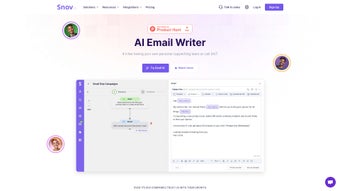
Snov Email Writer is a web‑based, AI‑driven solution that removes the friction from everyday email outreach. Powered by OpenAI’s language models and fine‑tuned with expert copywriting prompts, the tool helps marketers, sales professionals, recruiters, and anyone who needs to send persuasive emails to generate content in seconds. Whether you’re launching a cold‑email campaign, drafting a follow‑up sequence, or simply writing a thank‑you note, Snov Email Writer gives you a library of ready‑made prompts and the freedom to craft custom ones. The interface lets you control tone (formal, friendly, persuasive), adjust length, run real‑time grammar checks, and even translate the final copy into 36 languages—all without leaving the browser. Its native integration with Snov.io’s Drip Campaigns means the email you create can be pushed directly into an automated workflow, saving time and boosting conversion rates. In short, Snov Email Writer is a secure, free‑to‑start, cloud‑native app that democratizes professional email writing for users of any skill level.
Key Features
- AI‑Generated Content: Leverages OpenAI’s GPT‑4 to produce high‑quality email drafts instantly.
- Prompt Library: Hundreds of pre‑built prompts for cold outreach, follow‑ups, newsletters, and more.
- Custom Prompt Builder: Create your own templates with placeholder variables for dynamic personalization.
- Tone & Length Controls: Switch between formal, casual, or persuasive tones and set word count limits.
- Grammar & Style Checker: Real‑time suggestions ensure error‑free, polished copy.
- Multilingual Support: Translate emails into 36 languages, maintaining tone and context.
- Drip Campaign Integration: Seamlessly send generated emails to Snov.io’s automation platform.
- Collaboration Mode: Share drafts with team members for review and co‑editing.
- Secure Cloud Storage: All drafts are encrypted and saved to your Snov.io account.
- Free Tier & Affordable Plans: Start for free with generous limits; upgrade for unlimited usage.
Installation & Usage Instructions
Getting Started
Because Snov Email Writer is a web application, there is no traditional installation process. Simply navigate to Snov.io’s Email Writer portal, click Sign Up, and create an account using your email address or Google credentials. Once logged in, you’ll be taken to the dashboard where the main writing interface resides.
Step‑by‑Step Workflow
- Select a Prompt: Choose from the categorized library (Cold Outreach, Follow‑Up, Event Invite, etc.) or click “Create Custom Prompt” to design your own.
- Enter Variables: Fill in placeholders such as recipient name, company, product, or any custom fields you wish to personalize.
- Adjust Settings: Use the tone selector (Formal, Friendly, Persuasive) and length slider to fit the email’s purpose.
- Generate Draft: Hit “Generate” and let the AI craft a full email in seconds.
- Refine & Optimize: Review the suggested copy, apply grammar fixes, or ask the AI for alternative phrasing.
- Translate (Optional): Click the translation icon, pick a language, and receive a localized version instantly.
- Export or Send: Save the draft to your Snov.io account, copy to clipboard, or push directly to a Drip Campaign.
Best Practices
For maximum deliverability, keep subject lines concise, personalize at least two variables, and test the generated email with a small segment before a full rollout. The built‑in analytics in Snov.io can then track open rates, click‑throughs, and responses, allowing you to iterate on prompts for better performance.
Compatibility
Snov Email Writer runs entirely in the browser, making it compatible with any modern operating system that supports Chrome, Firefox, Edge, or Safari. Whether you’re on Windows 10/11, macOS Monterey or later, Linux distributions, Android 8.0+, or iOS 13+, the tool functions flawlessly. Because it’s cloud‑based, there are no hardware restrictions, and you can switch devices mid‑campaign without losing any drafts.
Pros and Cons
Pros
- Instant AI‑generated email drafts save hours of manual writing.
- Extensive prompt library covers most outreach scenarios.
- Customizable tone, length, and multilingual output.
- Seamless integration with Snov.io’s Drip Campaigns.
- Free tier available for startups and freelancers.
- Secure, encrypted cloud storage for all drafts.
Cons
- Reliant on internet connection; offline usage isn’t supported.
- Advanced features (unlimited generations, premium prompts) require a paid plan.
- AI may occasionally suggest generic phrasing that needs manual tweaking.
- Limited to the languages supported by the built‑in translator.
Frequently Asked Questions
Is Snov Email Writer really free to use?
Yes, Snov Email Writer offers a free tier that includes up to 50 email generations per month, access to the core prompt library, and basic tone/length controls. For higher volume or premium prompts, paid plans start at $15 per month.
Can I integrate Snov Email Writer with other CRM tools?
Direct integration is available with Snov.io’s own CRM and Drip Campaigns. For other CRMs, you can export the generated email content and import it manually, or use Zapier to create a custom workflow.
How secure is my data when using the cloud service?
All drafts are encrypted both in transit (TLS) and at rest (AES‑256). Snov.io complies with GDPR and CCPA standards, ensuring your personal and client data remain confidential.
What languages does the translation feature support?
Snov Email Writer can translate emails into 36 languages, including Spanish, French, German, Chinese (Simplified), Japanese, Arabic, and Portuguese. The translation engine preserves tone and context as much as possible.
Do I need any technical knowledge to create custom prompts?
No technical expertise is required. The prompt builder uses a simple placeholder system (e.g., {{first_name}}) and a visual editor, allowing anyone to design personalized templates in minutes.
Final Verdict & Call to Action
Snov Email Writer stands out as a reliable, AI‑enhanced writing companion that bridges the gap between creativity and efficiency. Its blend of pre‑crafted prompts, tone customization, multilingual output, and direct funnel integration makes it a compelling choice for both solo entrepreneurs and larger sales teams. While the reliance on an internet connection and the need for a paid plan for high‑volume users are minor drawbacks, the overall value—especially the free entry level—justifies a try. If you’re looking to boost reply rates, reduce writer’s block, and automate the mundane parts of email outreach, Snov Email Writer is ready to deliver.
Download Snov Email Writer now and start generating high‑impact emails in seconds. Experience the power of AI‑driven copywriting without the steep learning curve—your inbox (and your sales pipeline) will thank you.
Guides & Tutorials
How to install Snov Email Writer
- Click the Download button above.
- Once redirected, accept the terms and click Install.
- Wait for the Snov Email Writer download to finish on your device.
How to use Snov Email Writer
This software is primarily used for its core features described above. Open the app after installation to explore its capabilities.
User Reviews
No reviews yet. Be the first to share your experience.
You may also like
more
3D AI Studio
3D AI Studio Overview 3D AI Studio is a web-based AI-powered tool developed by S...

3D textures by Polycam
Generate Realistic 3D Textures Effortlessly 3D Textures by Polycam is an innovat...

3DAiLY
Customizable 3D Modeling Tool: 3DAiLY 3DAiLY is an online platform that harnesse...

3DFY
Revolutionizing 3D Model Creation: 3DFY Review 3DFY is an AI-powered service, de...

AI Dungeon
AI Dungeon: Deep Learning Text Adventure AI Dungeon is an artificial intelligenc...

Alpha3D
A subscription-based program for Web apps, by alpha3d. Alpha3D is a subscription...